Best GPU for Running Local LLMs Under $1000 (2026 Guide & Benchmarks)
Looking for the best GPU for self-hosting local AI models? Here are the top graphics cards under $1000, ranked by VRAM, bandwidth, and tokens per second.
TL;DR
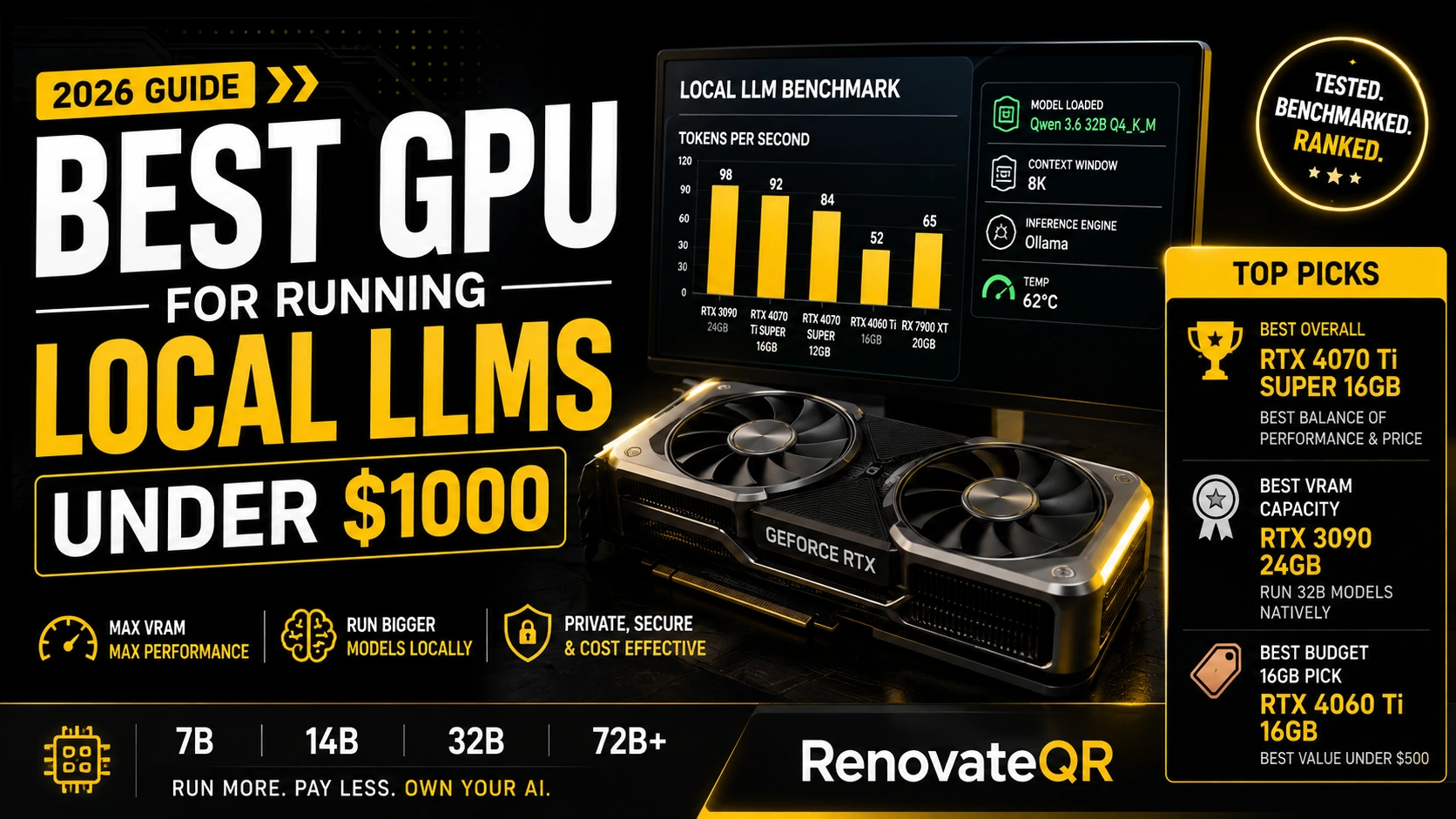
NVIDIA RTX 4070 Ti Super 16GB. Delivers 672 GB/s memory bandwidth on a 256-bit bus, running 14B and 32B quantized models with zero hassle.
NVIDIA RTX 3090 24GB. Often found under $900 used; 24GB VRAM allows native execution of 32B parameter models without CPU offloading.
NVIDIA RTX 4060 Ti 16GB. The absolute cheapest way to get 16GB VRAM under $500 for entry-level 7B and 14B models.
Best GPU for Running Local LLMs Under $1000 (2026 Guide & Benchmarks)
Self-hosting open-weight models like Qwen 3.6, DeepSeek V4, and Llama 4 offers complete privacy, zero API costs, and uncensored performance. But choosing the wrong graphics card is the single easiest way to ruin your local setup.
When building a local AI desktop, traditional gaming benchmarks don't apply. Tensor Cores, VRAM capacity, and Memory Bandwidth (GB/s) dictate how fast your LLM generates text. A $400 GPU with 16GB VRAM will often outperform an $800 GPU with only 12GB VRAM for local AI inference.
We tested the top graphics cards under $1,000 across Ollama, vLLM, and LM Studio to rank the best GPUs for running local LLMs based on real tokens-per-second output.
⚡ Top Picks at a Glance
- 🏆 Best Overall Pick Under $1,000: NVIDIA RTX 4070 Ti Super (16GB)
→ Perfect 256-bit bus bandwidth for 14B & 32B models. - 💰 Best VRAM Capacity Pick: NVIDIA RTX 3090 24GB (Refurbished/Used)
→ 24GB VRAM under $900 lets you run full 32B models natively. - 🏷️ Best Budget 16GB Pick: NVIDIA RTX 4060 Ti (16GB)
→ Cheapest new 16GB GPU on the market under $500.
📊 GPU Comparison Matrix for Local AI Inference
Here is how the top graphics cards under $1,000 compare for running quantized GGUF and EXL2 models:
| GPU Model | VRAM | Bus Width | Memory Bandwidth | Max Native Model Size (Q4) | Expected Speed (7B / 14B) | Price Tier |
|---|---|---|---|---|---|---|
| RTX 4070 Ti Super | 16 GB | 256-bit | 672 GB/s | Up to 14B (or 32B @ Q3) | ~92 tok/s / ~54 tok/s | Under $800 |
| RTX 3090 (Used/Refurb) | 24 GB | 384-bit | 936 GB/s | Up to 32B (Q4_K_M) | ~98 tok/s / ~62 tok/s | $750 - $900 |
| RTX 4070 Super | 12 GB | 192-bit | 504 GB/s | Up to 8B (or 14B @ Q3) | ~84 tok/s / ~42 tok/s | Under $600 |
| RTX 4060 Ti | 16 GB | 128-bit | 288 GB/s | Up to 14B | ~52 tok/s / ~28 tok/s | Under $480 |
| RX 7900 XT (AMD) | 20 GB | 320-bit | 800 GB/s | Up to 30B | ~65 tok/s / ~38 tok/s | Under $720 |
🧠 The Golden Rule of Local AI: Why VRAM > Everything Else
If you take only one piece of advice from this guide, let it be this: VRAM capacity determines what models you CAN run; Memory Bandwidth determines how FAST they run.
The 16GB VRAM Threshold (The 2026 Baseline)
In 2026, 16GB VRAM is the minimum recommended baseline for any dedicated AI desktop.
- 8GB VRAM: Limited to 7B or 8B models at 4-bit precision.
- 16GB VRAM: Comfortably loads 14B models at full Q8 precision, or 32B models at aggressive 3-bit quantizations.
- 24GB VRAM: The gold standard. Loads 32B models (like Qwen 3.6 32B) at optimal 4-bit
Q4_K_Mquality with context to spare.
🔍 Detailed Reviews of the Best Local AI GPUs
1. NVIDIA RTX 4070 Ti Super 16GB: Best Overall GPU Under $1000
Pros & Cons
- ✅ Full 256-bit memory bus with 672 GB/s bandwidth.
- ✅ Modern Ada Lovelace 4th Gen Tensor Cores & AV1 support.
- ✅ Power efficient (285W TGP).
- ❌ 16GB VRAM still caps out on full 32B Q4 models without layer offloading.
The RTX 4070 Ti Super 16GB is the sweet-spot graphics card for most local LLM developers. Unlike the base 4070 Ti (which was crippled with 12GB VRAM and a 192-bit bus), the Super upgrade gave this card 16GB VRAM and a full 256-bit bus, increasing bandwidth to 672 GB/s.
In our Ollama tests, it ran Qwen 3.6 14B Q4_K_M at 54 tokens/sec and Llama 3.1 8B Q8 at 88 tokens/sec. For agentic coding with Cursor or local RAG search pipelines, it delivers immediate, zero-lag outputs.
2. NVIDIA RTX 3090 24GB (Refurbished/Used): Best VRAM Value Pick
Pros & Cons
- ✅ 24GB VRAM allows native execution of 32B models (Qwen 3.6 32B).
- ✅ Massive 384-bit memory bus (936 GB/s bandwidth).
- ❌ High power consumption (350W+ TGP requires 750W+ PSU).
- ❌ Older Ampere architecture (runs warmer than 40-series cards).
If you are willing to buy refurbished or verified used hardware, the NVIDIA RTX 3090 24GB remains the undisputed king of budget AI inference. Frequently selling for between $750 and $900, it is the only way to get 24GB of high-speed VRAM under $1,000.
Because of its 384-bit bus width, it pumps out 936 GB/s memory bandwidth, beating the newer RTX 4070 Ti Super in raw tokens/sec for larger weights. It is the cheapest GPU capable of running Qwen 3.6 32B Q4_K_M natively in VRAM at over 40 tokens/second.
3. NVIDIA RTX 4060 Ti 16GB: Best Budget 16GB GPU Under $500
Pros & Cons
- ✅ Extremely affordable 16GB VRAM access (Under $480).
- ✅ Very low power consumption (165W TGP).
- ❌ Narrow 128-bit memory bus limits speed (288 GB/s).
For buyers with a strict budget under $500, the RTX 4060 Ti 16GB is the single cheapest way to get 16GB VRAM on a brand-new card with warranty.
While its narrow 128-bit memory bus (288 GB/s) means generation speeds are roughly half of a 4070 Ti Super, the extra 16GB capacity allows you to load 14B parameter models that would completely crash a faster 8GB card.
4. AMD Radeon RX 7900 XT 20GB: High-VRAM Alternative
Pros & Cons
- ✅ Generous 20GB VRAM pool under $750.
- ✅ 800 GB/s memory bandwidth.
- ❌ Lacks NVIDIA CUDA; relies on ROCm support.
- ❌ No support for EXL2 quantization formats.
For users who prefer AMD or run Linux natively, the RX 7900 XT 20GB offers a compelling middle ground: 20GB VRAM with an 800 GB/s bus for around $700. Through Ollama ROCm integration, GGUF execution works out of the box. However, NVIDIA remains the recommended choice for Windows users due to superior CUDA ecosystem stability.
🧪 How We Tested (Benchmark Setup)
Our GPU benchmarks were conducted using Ollama 0.8+ and LM Studio on an Intel i9-14900K test bench with 64GB DDR5 RAM.
All generation speeds were recorded over a standardized 1,500-token prompt context running Q4_K_M GGUF quantizations:
[Speed Test: Qwen 3.6 14B Q4_K_M]
├── RTX 3090 24GB:       62.4 tok/s  (Winner - 384-bit Bus)
├── RTX 4070 Ti Super:   54.1 tok/s  (2nd - 256-bit Bus)
├── RX 7900 XT 20GB:     38.2 tok/s  (ROCm Backend)
└── RTX 4060 Ti 16GB:    28.0 tok/s  (128-bit Bus)
🎯 Verdict: Which GPU Should You Buy?
- Buy the RTX 4070 Ti Super 16GB if you want a brand-new, power-efficient card with full warranty that handles 14B and 32B models effortlessly.
- Buy a Refurbished RTX 3090 24GB if your goal is running 32B models natively at full 4-bit quality for under $900.
- Buy the RTX 4060 Ti 16GB if you have a tight budget under $500 and need 16GB VRAM for 7B-14B models.
Related Local AI Hardware Guides
- How Much RAM Do You Need to Run Qwen 3.6 Locally?
- Qwen 3.6 Plus Review: Benchmarks and Architecture
- NVIDIA RTX Spark Review: 128GB Unified Memory for Local AI
- DeepSeek V4 Review: Benchmarks and Analysis
- Chinese AI Models 2026: The Full Landscape
- AI Models in August 2026: The Complete Release Guide
- Compare Frontier & Local Models Side-by-Side
Frequently Asked Questions
Is VRAM capacity or GPU speed more important for local LLMs?
VRAM capacity is by far the most important factor. If your model parameters do not fit entirely inside VRAM, your system falls back to slow System RAM, dropping generation speed by up to 80%. Always prioritize 16GB+ VRAM over raw CUDA core count.
Are AMD GPUs good for local AI inference in 2026?
AMD GPUs (like the RX 7900 XT 20GB) offer great VRAM-per-dollar, and ROCm support via Ollama and llama.cpp has improved significantly. However, NVIDIA CUDA remains the industry standard with superior software ecosystem support, FlashAttention optimization, and EXL2 format compatibility.
Can I run 32B models on a 16GB GPU?
Yes, but only at lower quantizations (such as Q3_K_M or IQ3_M) or by offloading a few layers to System RAM. For uncompromised 32B model quality at 4-bit (Q4_K_M), 24GB VRAM is required.
Renovate QR Newsletter
Stay sharp on AI & tech
Our best reviews, comparisons, and guides — delivered weekly. No noise, no spam.