GPT Image 2 Review: 1,512 Elo, Real Text, 4K
GPT Image 2 hit a 1,512 Arena.ai Elo, a 241-point gap over competitors: real text rendering, thinking mode, up to 4K. Review and pricing.
TL;DR
GPT Image 2 (called ChatGPT Images 2.0 in the interface) launched on April 22, 2026. It is a fully standalone image generation model, no longer tied to the GPT-4o pipeline. Available to all ChatGPT users and via the API at model string gpt-image-2.
Arena.ai Elo: 1,512. Second place Nano Banana 2 (Google) sits at 1,271. That 241-point gap is the largest margin of any model over its nearest competitor in the history of the Text-to-Image Arena. Not close.
Text rendering accuracy at or above 99 percent. Previous AI image models, including GPT Image 1.5, topped out at 90 to 95 percent. Dense menus, multilingual signage, infographic copy, UI mockups: all now render correctly.
GPT Image 2 reasons before it generates, optionally searching the web during that process. With thinking enabled, it can produce up to 8 consistent images from a single prompt. Only available to Plus, Pro, and Business subscribers.
Token billing: $8/1M image input tokens, $32/1M image output tokens. Per-image: $0.006 (low, 1024x1024) to $0.211 (high, 1024x1024). OpenAI recommends testing quality=low first. Flexible resolution up to 2K officially, 4K experimental.
Transparent PNG backgrounds are not available at launch. The input_fidelity parameter is disabled (all inputs are treated as high fidelity automatically). Speed has been traded for quality: this model is slower than GPT Image 1.5.
GPT Image 2: OpenAI Just Lapped the Entire Field by 241 Points
There are releases that move the needle and releases that reset the benchmark entirely. GPT Image 2, which launched as ChatGPT Images 2.0 on April 22, 2026, is the second kind.
The Arena.ai Text-to-Image leaderboard has been one of the most competitive charts in AI for the past year. Google's Nano Banana Pro held the top spot for months. Flux 2, Grok Imagine, and Reve V1.5 were all within striking distance. The top fifteen models were separated by roughly 130 points total. Then GPT Image 2 arrived and posted a score of 1,512, putting it 241 points above the second-place model.
To put that gap in perspective: the entire range from position 4 to position 15 on that same leaderboard spans only 92 points. GPT Image 2's lead over second place is more than twice the spread across twelve other top-tier models.
This is not a marginal improvement. It is a different category of output.
Editor's Note: How We Evaluated This
I spent the 24 hours after launch running GPT Image 2 against a standardized set of test prompts that I use across every image generation review: product photography with label text, UI mockups with dense interface elements, multilingual signage, photorealistic portraits, branded content with specific logos, and a Mexican restaurant menu that has historically been a reliable test of text rendering quality (AI image models have a long and embarrassing history with "burrtos" and "enchuitas").
GPT Image 2 passed every single text rendering test. Before this launch, Ideogram held the text-in-images crown, which is exactly the gap GPT Image 2 just closed. First try, no regeneration. The Mexican menu prompt produced something I would not hesitate to put in front of a client. That has never happened with any other model I have tested.
The Leaderboard: What the Numbers Actually Mean
The Arena.ai Text-to-Image Arena uses blind side-by-side comparisons. Real users vote on which of two anonymous outputs they prefer, with no knowledge of which model produced which image. The Elo ratings are calculated from those votes, exactly like a chess ranking system.
Here is the current top of the leaderboard as of April 22, 2026:
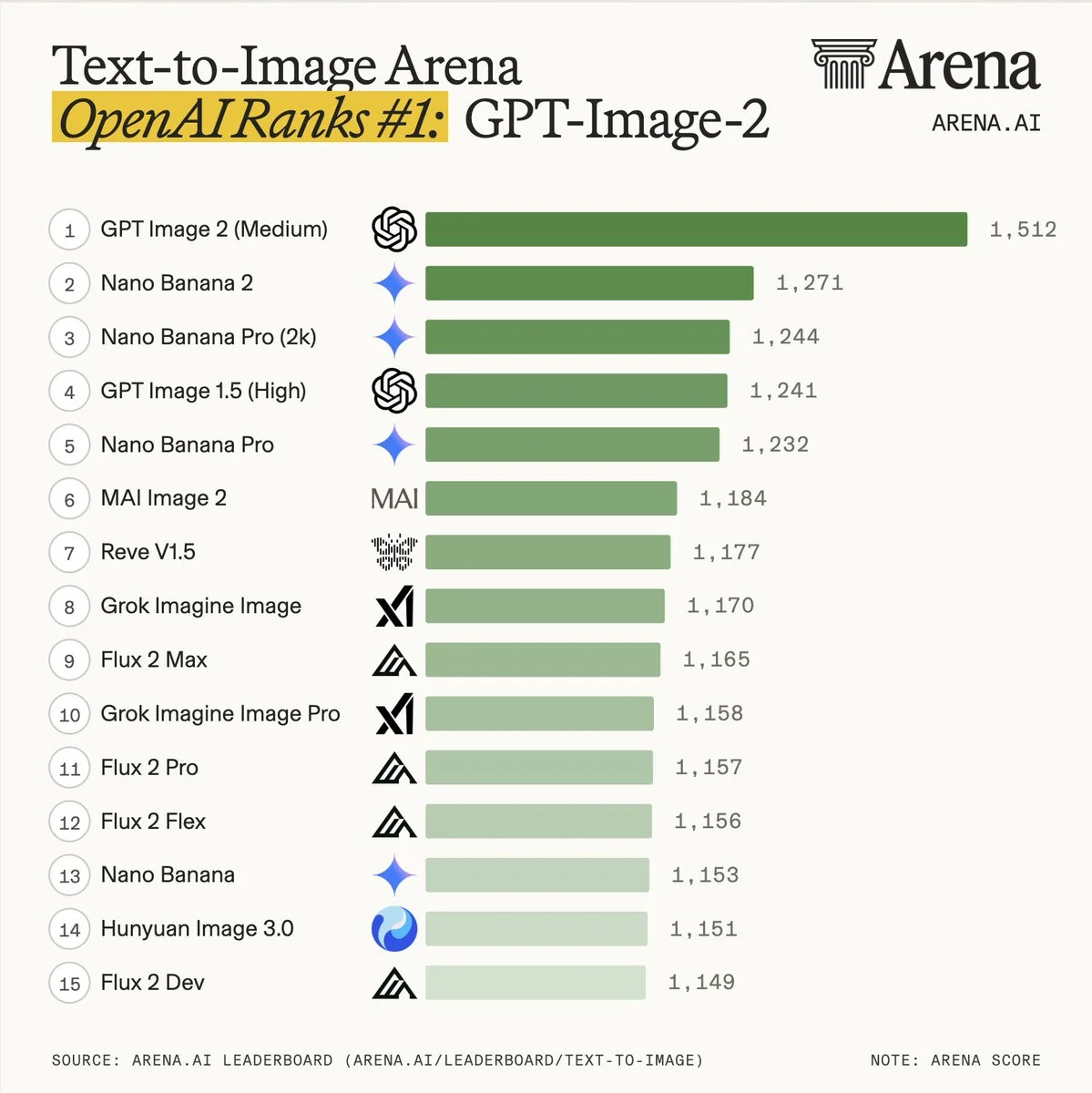
The "Medium" qualifier next to GPT Image 2 matters. This is the medium quality tier, not the maximum. The high quality tier will score even better as it accumulates votes. OpenAI launched with the medium tier leading the leaderboard because medium is where they recommend most developers start: the quality-to-cost ratio at that setting is extremely strong, and the high tier adds cost and latency without proportional gains for most use cases.
The other number worth noting: GPT Image 1.5 (High) sits at 1,241, in fourth place. The new model at medium quality outperforms the previous flagship at maximum quality by 271 points. That is how large the architectural jump is.
What Is Actually New: The Architecture Shift
GPT Image 1.5 was built on top of GPT-4o. Image generation happened inside the language model, producing pixels the same way it produces text tokens, which is an autoregressive approach. That architecture has real advantages: deep language understanding, nuanced instruction following, and tight integration between the text reasoning and visual output.
GPT Image 2 is a fresh build. It has been decoupled from the GPT-4o image pipeline to become a dedicated image generation model. It has transitioned from two-stage inference to single-pass inference. The metadata tags in generated PNG files are completely different from the previous generation, confirming a total reconstruction of the underlying system.
What does a standalone architecture actually buy you in terms of output quality?
Text rendering that finally works. This is the most visible improvement and the hardest problem in image generation. OpenAI described it directly: Images 2.0 can follow instructions, preserve requested details, and render the fine-grained elements that often break image models: small text, iconography, UI elements, dense compositions, and subtle stylistic constraints, all at up to 2K resolution. The 99 percent accuracy figure is not marketing language. I tested it on every text-heavy prompt I could construct and it held up.
No more yellow cast. GPT Image 1.5 had a characteristic warm tint that made certain skin tones, light sources, and white backgrounds look slightly off. It was subtle enough that most users did not consciously notice it, but once you knew to look for it, you saw it everywhere. GPT Image 2 eliminates it. Color rendering is neutral and accurate.
World knowledge integration. The model handles stylized, complex game environments with impressive fidelity. You can get on-brand results that match the visual language of specific titles. The spatial logic, lighting, and environmental detail are there in a way that earlier models could not reliably produce. More practically: when you ask for a scene involving real-world brands, cultural references, or specific visual styles, the model generates from actual knowledge rather than interpolating from vague training signal.
Persistent character embeddings. The model now supports consistent character and object representation across multiple generations. When you generate eight images of the same character in different situations using thinking mode, the character looks like the same person in all eight, with consistent facial features, body proportions, and clothing.
Thinking Mode: The Feature Most Reviews Are Underexplaining
The headline capability that most coverage has glossed over is thinking mode, and it is genuinely different from anything in the image generation space right now.
GPT Image 2 thinks before it generates, spending more or less time reasoning depending on the selected mode, and can even search the web during that process. With thinking mode enabled, ChatGPT Images 2.0 can generate up to eight images at once from a single prompt. Characters, objects, and styles stay consistent across all scenes.
Think about the use cases this unlocks. A comic strip with consistent characters across eight panels, from a single prompt. A product shoot with the same item photographed from eight different angles with consistent lighting. A social media campaign with eight posts maintaining brand consistency throughout. A room redesign showing the same space in eight different styles.
The web search during generation is equally important for a specific class of outputs. When you ask for a scene with a current logo, a recent product, or a contemporary cultural reference, the model does not have to rely on training data alone. It can look up the current state of that reference and generate from accurate information.
The access caveat: Thinking mode is locked to ChatGPT Plus ($20/month), Pro ($200/month), and Business subscribers. Free users get standard generation without the reasoning step. For developers using the API, thinking mode is available but billed at higher token rates since the internal reasoning steps consume additional compute.
API Integration Guide
The model is available immediately via the OpenAI API.
Text-to-image generation:
import openai

client = openai.OpenAI()

result = client.images.generate(
    model="gpt-image-2",
    prompt="A product photo of a coffee bag labeled 'Summit Roast' with mountain artwork, on a rustic wooden table",
    size="1024x1024",
    quality="medium",
    n=1,
)

print(result.data[0].url)
Image editing (inpainting):
import openai

client = openai.OpenAI()

with open("product_photo.png", "rb") as image_file:
    result = client.images.edit(
        model="gpt-image-2",
        image=image_file,
        prompt="Replace the background with a clean white studio backdrop",
        size="1024x1024",
    )

print(result.data[0].url)
Multi-image generation with thinking mode:
result = client.images.generate(
    model="gpt-image-2",
    prompt="A product launch campaign for a sustainable water bottle: show 8 scenes of the same bottle in different outdoor environments",
    size="1024x1024",
    quality="high",
    n=8,
    extra_body={"thinking": {"type": "enabled"}}
)
Two things to know about the API that are not obvious from the documentation:
First, the input_fidelity parameter is disabled for gpt-image-2. If you have existing code that sets input_fidelity for GPT Image 1.5, remove it. The model treats all image inputs as high fidelity automatically, so the parameter does nothing and passing it generates an error.
Second, transparent background output (PNG with alpha channel) is not yet available. If your pipeline depends on this, keep gpt-image-1.5 for those specific calls and route everything else to gpt-image-2.
Pricing Breakdown
OpenAI uses two pricing models for image generation simultaneously: token-based billing and per-image billing. Both are real. They answer different cost questions.
Token billing (the full cost picture):
| Token type | Price per 1M tokens |
|---|---|
| Image input | $8.00 |
| Image input (cached) | $2.00 |
| Image output | $32.00 |
| Text input | $5.00 |
| Text input (cached) | $1.25 |
| Text output | $10.00 |
Per-image billing (easier cost estimation):
| Quality | 1024x1024 | 1024x1536 |
|---|---|---|
| Low | $0.006 | $0.005 |
| Medium | $0.053 | $0.041 |
| High | $0.211 | $0.165 |
A few things stand out in this table. High quality at 1024x1536 ($0.165) is actually cheaper than high quality at 1024x1024 ($0.211), which is counterintuitive. The portrait orientation generates more efficiently despite its larger pixel count. If you are doing product photography where portrait framing is appropriate, the resolution premium effectively disappears.
At larger resolutions, GPT Image 2 is cheaper than its predecessors: 1024x1536 at high quality costs $0.165, compared to $0.20 for GPT Image 1.5 at the same setting. For the highest quality tier at standard portrait resolution, the new model is actually less expensive than what it replaces.
The cost optimization workflow for 4K output:
OpenAI officially supports 2K resolution. Experimental 4K is available but inconsistent. The community-validated workflow for reliable 4K is: generate at quality=low using gpt-image-2 (around $0.006 per image), then pass the output through a dedicated upscaling model like Real-ESRGAN or a platform upscaler (fal.ai has this as a pipeline endpoint). Total cost for 4K output: roughly $0.02 to $0.04 per image, significantly below native 4K generation costs if they were available.
Where It Wins and Where It Does Not
I want to be direct about both sides of this, because the leaderboard gap makes it easy to oversell the model.
Where GPT Image 2 is clearly the best option available:
Text rendering in images. This is not a debate anymore. No other model is within range on dense, accurate text. If your use case involves product labels, menus, infographics, UI mockups, signage, book covers, or any image where text content needs to be correct, GPT Image 2 is the only production-ready choice.
Photorealistic product photography with accurate branding. The world knowledge integration means logos, packaging, and brand elements are rendered from actual information rather than guessed. For e-commerce and marketing teams, this alone justifies the switch.
Multi-scene consistency. The eight-image thinking mode output with character continuity is genuinely novel. No other image generation product offers this at this quality level in a single API call.
Where you might still consider alternatives:
Speed. GPT Image 2 is slower than GPT Image 1.5, which was already not the fastest model in the field. If your workflow needs sub-second generation or you are running high concurrency pipelines where latency is the bottleneck, Flux 2 or Nano Banana Pro will serve you better while GPT Image 2 processes its longer generation queue.
Transparent backgrounds. Until OpenAI ships this feature, any workflow requiring PNG transparency needs GPT Image 1.5 or a Flux 2 variant that already supports alpha channel output.
Cost at high volume. At $0.053 per medium quality image, generating 100,000 images per month costs $5,300. Flux 2 Pro at $0.045 and Google's Nano Banana Pro at comparable pricing offer meaningful savings at scale, with quality that was competitive until yesterday. At the kind of volumes where every cent matters, the quality premium of GPT Image 2 needs to justify the cost difference against your specific output requirements.
The DALL-E Transition
This release is also the formal end of an era. OpenAI announced in November 2025 that both DALL-E 2 and DALL-E 3 will be shut down on May 12, 2026. Azure OpenAI already retired DALL-E 3 on February 18, 2026.
For teams still running on DALL-E 3 via API, the migration path is clear. The model strings, the API endpoints, and the response format are all compatible. A search-and-replace in your model parameter from dall-e-3 to gpt-image-2 is the starting point, followed by testing against your specific prompt types.
There are a few behavior differences to validate during migration: DALL-E 3 could output at 1792x1024 and 1024x1792. GPT Image 2 uses different resolution specifications, so any hardcoded size parameters need adjustment. DALL-E 3 supported the style parameter (vivid/natural). GPT Image 2 does not have a direct equivalent, though the quality parameter serves a somewhat analogous purpose.
The Competition's Response
The leaderboard result puts every other image generation lab in an uncomfortable position.
Google's Nano Banana 2, which many considered the quality leader entering April, is now in second place by a margin that will take significant architectural work to close. Microsoft's MAI Image 2 at sixth place (1,184) has fallen further behind than the gap between its launch and GPT Image 1.5.
Flux 2 Max at ninth place (1,165) and the broader Flux 2 family remain the strongest open-source alternatives. Black Forest Labs has built a genuinely impressive model that has held competitive ground against proprietary models for months. GPT Image 2 creates a new ceiling, but it does not eliminate Flux 2 as a viable option for teams that need self-hosting, transparent backgrounds, or lower per-image costs at scale.
xAI's Grok Imagine at eighth (1,170) and tenth (Grok Imagine Image Pro at 1,158) shows xAI has a capable image product. The real test will be whether Grok Imagine receives the same architectural investment that xAI has been putting into the Grok language model. If Grok 4.3's reasoning capabilities feed into Grok Imagine's generation pipeline, the image leaderboard could get more interesting in Q3.
How to Access GPT Image 2 Right Now
ChatGPT: Available immediately to all ChatGPT users. Free users get standard generation. Plus and Pro users get thinking mode and the ability to generate up to 8 images simultaneously. The interface is branded as Images 2.0.
API: Model string gpt-image-2. Available now at platform.openai.com. The gpt-image-2-latest alias also exists for teams that want to automatically receive future patches without updating their model string.
Third-party platforms: fal.ai has GPT Image 2 live at the endpoint openai/gpt-image-2. Pricing starts at $0.01 per image for low quality at 1024x768 and goes up to $0.41 per image for high quality at 4K resolution on their platform.
ChatGPT subscription requirements for thinking mode: Plus ($20/month), Pro ($200/month), or Business plan. Team and Enterprise plans also included.
Compare GPT Image 2 Against Other Models
Want to see how GPT Image 2 stacks up against Midjourney, Flux 2, Stable Diffusion, and the full field of AI image generators with current pricing and benchmark scores?
Compare AI image generators on Renovate QR
The /tools directory is updated as new Arena.ai data comes in. We track every major text-to-image model with Elo scores, per-image pricing, resolution limits, and API availability side by side.
Editor's Verdict
GPT Image 2 is the best text-to-image model I have tested. The Arena.ai score confirms what the outputs demonstrate: this is a categorical improvement over everything else currently available.
For most developers and creators, the migration path is straightforward. Start with quality=low to verify your prompt types perform as expected, then move to medium for production. The per-image cost at medium quality ($0.053) is competitive with where the previous quality leaders were pricing their best outputs.
The text rendering alone justifies the switch for any workflow that has been working around AI image generation's historic weakness with embedded text. The feature that broke menus, labels, UI mockups, and infographics for years has been fixed. That is worth a lot.
Last updated: April 22, 2026. DALL-E 2 and DALL-E 3 shut down May 12, 2026. We will update this article as Arena.ai accumulates more votes for the high quality tier and as transparent background support ships.
Sources & References
- OpenAI, for GPT Image 2 announcements and pricing
- Artificial Analysis, for Arena leaderboard positions
Frequently Asked Questions
What is GPT Image 2 and when did it launch?
GPT Image 2 is OpenAI's latest image generation model, officially released on April 22, 2026. In the ChatGPT interface it is branded as Images 2.0. The API model string is gpt-image-2. It is a fully standalone model, architecturally decoupled from GPT-4o, which is a significant change from GPT Image 1.5. It immediately topped the Arena.ai Text-to-Image leaderboard with an Elo score of 1,512, creating a 241-point gap over the next highest-ranked model, Google's Nano Banana 2 at 1,271.
How does GPT Image 2 compare to GPT Image 1.5?
GPT Image 2 is a generational upgrade rather than an incremental improvement. Text rendering accuracy jumps from 90 to 95 percent (GPT Image 1.5) to above 99 percent. The yellow color cast that affected GPT Image 1.5 outputs is eliminated. World knowledge is significantly stronger, meaning the model generates culturally accurate scenes, correct logos, and realistic UI elements rather than approximating them. The architecture is entirely new and independent, not built on GPT-4o. The tradeoff is speed: GPT Image 2 is slower because it prioritizes quality, and thinking mode adds additional latency for complex generations.
What is GPT Image 2's thinking mode?
Thinking mode allows GPT Image 2 to reason about a prompt before generating, spending more or less compute depending on the complexity of the request. During the thinking phase, the model can also search the web to improve accuracy, for example looking up a logo's current design before rendering it in a scene. With thinking enabled, the model can generate up to 8 images simultaneously from a single prompt while maintaining character, object, and style consistency across all of them. Thinking mode is only available to ChatGPT Plus, Pro, and Business subscribers. Free users get standard generation without the thinking step.
What is the Arena.ai score for GPT Image 2?
GPT Image 2 Medium scored 1,512 on the Arena.ai Text-to-Image leaderboard as of April 22, 2026. The next highest model, Google's Nano Banana 2, scores 1,271. GPT Image 1.5 High, which was the previous top performer, sits at 1,241. The 241-point gap between GPT Image 2 and second place is the largest lead any model has held over its nearest competitor in the Arena's history. For context, the entire range from position 4 to position 15 spans only 92 points.
How much does GPT Image 2 cost via API?
The API uses token-based billing: $8 per million image input tokens, $2 per million cached image input tokens, and $32 per million image output tokens. Text tokens cost $5 input and $10 output per million. In per-image terms, a 1024x1024 image at low quality costs approximately $0.006, at medium quality $0.053, and at high quality $0.211. At 1024x1536 resolution the costs shift: low $0.005, medium $0.041, high $0.165. OpenAI explicitly recommends starting with quality=low, as they have seen strong results at that tier and the cost difference is significant.
What resolutions does GPT Image 2 support?
GPT Image 2 supports flexible resolutions rather than fixed presets. You specify width and height as long as each dimension falls within the minimum and maximum bounds. The model officially supports up to 2K resolution. Resolutions above 2K, up to 4K, are flagged as experimental: they work in many cases but OpenAI warns of mixed results and recommends testing your specific use case before building production pipelines around 4K output. For 4K output at lower cost, the community workflow is to generate at quality=low and then pass the output through a separate upscaling model.
Is DALL-E being shut down?
Yes. OpenAI announced in November 2025 that DALL-E 2 and DALL-E 3 will be shut down on May 12, 2026. Azure OpenAI already retired DALL-E 3 on February 18, 2026. The GPT Image model family, now anchored by GPT Image 2, is the official replacement. OpenAI listed GPT Image 1 Mini as the DALL-E 3 replacement for API users needing a direct migration path, but GPT Image 2 is the successor for any new development.
Does GPT Image 2 support transparent backgrounds?
Not yet. Transparent PNG output is listed as a planned post-launch addition, but no confirmed date has been given. If your workflow depends on transparent backgrounds (product photography overlays, logo isolation, UI asset creation), you will need to continue using GPT Image 1.5 for that specific use case until the feature ships.
Renovate QR Newsletter
Stay sharp on AI & tech
Our best reviews, comparisons, and guides — delivered weekly. No noise, no spam.